








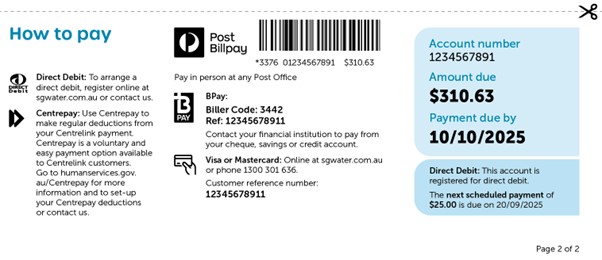
Since July 2025, each customer has been assigned a new reference numbers. When paying via internet banking, your BPay Payment Reference Numbers MUST be updated with your new reference numbers, found on page 2 of your bill.
Below are two examples that may help:
Bank Scenario Example 1
DELETE old biller details for South Gippsland Water:
Log into your online banking platform or mobile app. Select:
CREATE NEW biller details for South Gippsland Water:
Bank Scenario Example 2
DELETE old biller details for South Gippsland Water:
Log into your online banking platform or mobile app. Select:
CREATE NEW biller details for South Gippsland Water:
Steps vary depending on your bank – some links to banks are provided below. Guidance can be found under the Help and Support or FAQ (Frequently Asked Questions) section on your bank’s website.
Bendigo Bank: Credit cards, bank accounts, home loans and more | Bendigo Bank
Westpac Bank: Westpac – Personal, Business and Corporate Banking
ANZ Bank: Internet banking | ANZ
Commonwealth Bank: CommBank – bank accounts, credit cards, home loans and insurance
NAB Bank: NAB personal banking | Loans, accounts, credit cards, insurance – NAB
If you wish to pay in person using this method, you will need to request a new card to be mailed to you. Using your old card risks your payment being applied to the wrong account. Please email billing@sgwater.com.au or call us on 1300 851 636 to request a new card.
If you had previously updated your postal address with eNotices, this will not be reflected in our billing system and database as the eNotices system is operated by a third-party provider.
In July 2025, South Gippsland Water established a new billing and IT system. There was a small portion of customer accounts that did not correctly migrate from our old system, and we needed more time to ensure we were billing accurately. As a result, approximately 1,500 customers did not receive a bill for Quarter 1: 1 July to 30 September 2025. These customers have had their bills for this period waived.
There are approximately 1,000 customers who have also had their Quarter 2 bill: 1 October to 31 December delayed. These customers will receive a letter and their Quarter 2 bill via mail in early April.
Delayed Quarter 2 bills will be issued with 4 months to pay. We can offer other tailored payment support should these delayed bills cause any financial stress.
Customers impacted by delayed bills may have:
If this delayed bill causes any financial stress or concern, please contact our team on 1300 851 636. We are here to help and can work with you to arrange tailored payment options or assistance.
We apologise for the inconvenience of the delay in updating these accounts. Our Customer Service Team has been working hard to update all accounts, including balance transfers from property settlements. This backlog of work has been substantial and is expected to extend into 2026.
Why am I receiving my bill via post instead of email?
Due to an issue with our e-billing that occurred during September, you will receive your bills via post until further notice. We are working to restore e-billing as an option to our customers. We have prioritised data security and privacy until we can be sure the same issue will not occur again in future. In the meantime, you will have no access to the eNotices portal until this issue is resolved. What happened? In September 2025, our e-billing provider (eNotices) accidentally sent a number of bills to an email address linked to previous owners of properties, instead of to the current customer’s email address. This occurred during the first billing run from our new billing system with approximately 1,300 customers impacted. We are reviewing and correcting the data migration process completed by our e-billing partner (eNotices) to ensure this does not happen again.
Why does my bill look different?
We redesigned bills to be clearer and easier to read:
Why doesn’t my bill show usage graphs or comparisons?
For around 2,000 accounts, we couldn’t display historic meter data in this first billing run. Those graphs and comparisons will return on future bills.
Why are there unusual transactions on my account?
When we moved balances into the new system, some customers may notice transactions such as Migrate Balance, Opening Adjustment, or Balance Transfer. These were added to make sure your opening balance is correct.
Accounts with concessions, non-profit rebates and credit balances have often been the accounts where we needed to manually check and fix through adjustments added to accounts.
For credit adjustments, these have been added as ‘payments’ to accounts and will appear under the total payments received on the front page of the bill.
My bill shows lots of past meter readings. Have I been charged for these?
No. Your charges are based only on the most recent meter reading. Past readings may appear this time, but they won’t in future bills.
What if I think my bill is wrong?
Please contact us with your account details and why you think it may be incorrect.
📞 Call 1300 851 636
📧 Email billing@sgwater.com.au
We have extra phone lines set up to help with billing issues.
What if my usage looks high?
Before calling us, you can:
Why did I get an estimated bill?
If we couldn’t access your meter, your usage may have been estimated. You can give us an actual reading by calling or email a photo showing the dials and meter serial number to billing@sgwater.com.au.
What if my bill arrived late and I need more time to pay?
We’ve extended the due date for this first bill run to 10 October 2025. We won’t charge penalty interest or send overdue accounts to debt collection. If you need more time or support, please call us — we can help.
Why is my concession amount smaller?
Because billing is now quarterly, your concession is split across four bills instead of three. For this bill, it covers 92 days and is capped at $93.79 for 2 services (i.e. water and sewerage) or $46.89 for one service (i.e. water usage only). It appears as an adjustment on page 1 and in detail on page 2 of your bill.
Do I have a new account number?
Yes — most customers now have a new account number, shown at the top right of your bill. Please update your saved BPAY details. If you forget, we’ll still make sure your payment is applied correctly.
What about BPAY View?
BPAY View is no longer available. Once our new customer portal is live, you’ll be able to choose how you receive your bills. Until then, you’ll receive paper bills.
What’s the new billing cycle?
We’ve moved to quarterly billing. Bills are issued four times a year, usually in late August, November, February, and May, with payment due at least 28 days after issue. Charges are now calculated on a daily rate.
My concession is not shown on my account.
Please use our online form and electronically sign this using docusign to provide your concession details and consent.
| Activity | Quarter 1 | Quarter 2 | Quarter 3 | Quarter 4 |
| 1/7 to 30/9 | 1/10 to 31/12 | 1//1 to 31/3 | 1/4 to 30/6 | |
| Meter Reading | July | October | January | April |
| Bills issued – Target | Late August | Late November | Late February | Late May |
Bills due + 28 days from day of issue
Cheques are no longer accepted
You can no longer pay your account by cheque. There are still many ways to pay and we are always here to help you find the best option that suits your circumstances.
Can I still pay at the Post Office?
We are working with Australia Post to ensure barcoding on your bill will work at your local post office.
What if my account displays ‘extra transactions’?
Some bills may display extra transactions, such as account adjustments or migrated balances. These adjustments were part of ensuring that all customer balances were correct when we transferred data from our previous billing system. While the bill format may look different this time, we have checked all balances carefully. These extra transactions do not easily translate into a standard bill template and will not appear on future bills.
What about direct debits?
What if my direct debit fails?
If a direct debit fails and the amount is still owing after the due date, your account will be flagged and a reminder notice sent.
When will the new customer portal be ready?
We’re working hard to launch the portal, likely before the billing cycle in February 2026.
Why isn’t my recent payment showing?
Bills were generated on 5 September 2025, so any payments made after that date will not appear until your next bill.
How many bills have been sent?
We calculated 24,931 bills in our first billing run. About 1,744 accounts did not receive a bill because we need to do extra checks first.
Which accounts haven’t been sent yet?
Why are some accounts delayed?
We’ve moved three older systems into one modern, cloud-based system. Some accounts are more complex and need extra checks before we send a bill. Your account may take longer if you:
Why are bills delayed overall?
It’s taken longer than expected to get our new billing system up and running. We’ve held back some bills so we can double-check details and make sure they’re right before sending.