

Since July 2025, each customer has been assigned a new reference numbers. When paying via internet banking, your BPay Payment Reference Numbers MUST be updated with your new reference numbers, found on page 2 of your bill.
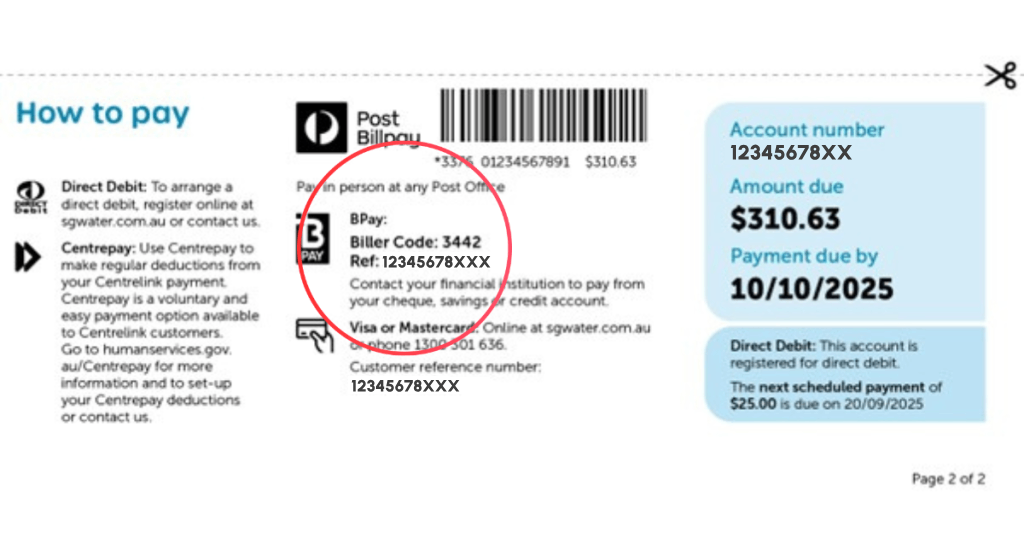
Below are two examples that may help:
Bank Scenario Example 1
DELETE old biller details for South Gippsland Water:
Log into your online banking platform or mobile app. Select:
CREATE NEW biller details for South Gippsland Water:
Bank Scenario Example 2
DELETE old biller details for South Gippsland Water:
Log into your online banking platform or mobile app. Select:
CREATE NEW biller details for South Gippsland Water:
Steps vary depending on your bank – some links to banks are provided below. Guidance can be found under the Help and Support or FAQ (Frequently Asked Questions) section on your bank’s website.
Bendigo Bank: Credit cards, bank accounts, home loans and more | Bendigo Bank
Westpac Bank: Westpac – Personal, Business and Corporate Banking
ANZ Bank: Internet banking | ANZ
Commonwealth Bank: CommBank – bank accounts, credit cards, home loans and insurance
NAB Bank: NAB personal banking | Loans, accounts, credit cards, insurance – NAB
If you wish to pay your account using an Australia Post payment card, please ensure your card has your new account reference number (since July 2025). If you are still using your original card, please email billing@sgwater.com.au or call us on 1300 851 636 to request a new card.
If you had previously updated your postal address with eNotices, this will not be reflected in our billing system and database as the eNotices system is operated by a third-party provider.
In July 2025, South Gippsland Water established a new billing and IT system. There was a small portion of customer accounts that did not correctly migrate from our old system, and we needed more time to ensure we were billing accurately. As a result, approximately 1,500 customers did not receive a bill for Quarter 1: 1 July to 30 September 2025. These customers have had their bills waived for this period.
There are approximately 1,000 customers who have also had their Quarter 2 bill: 1 October to 31 December delayed. These customers were sent a letter and received their Quarter 2 account in late April with an extended due date of four months.
Customers impacted by delayed bills may have:
We sincerely apologise for any inconvenience or concern as a result of these delayed accounts. Our Customer Service Team is here to help and can work with you to arrange tailored payment options and assistance to reduce financial stress. Please contact our team via email at billing@sgwater.com.au or phone 1300 851 636.
We understand everyone’s situation is different and can work with you to find a solution. Please reach out to our Customer Service team via email at billing@sgwater.com.au or by calling 1300 851 636.
Why am I receiving my bill via post instead of email?
To prioritise the security and privacy of your information, we will be sending your bills by post until further notice. The eNotices portal and My Account feature will not be available while we work on our new customer portal. Please make sure your mailing address is current. Thank you for your understanding and we’ll let you know as soon as the new customer portal is available
Why does my bill look different?
We redesigned bills to be clearer and easier to read:
What if I think my bill is wrong?
Please contact us with your account details and why you think it may be incorrect.
📞 Call 1300 851 636
📧 Email billing@sgwater.com.au
What if my usage looks high?
Before calling us, you can:
Why did I get an estimated bill?
If we couldn’t access your meter, your usage may have been estimated. You can give us an actual reading by calling or email a photo showing the dials and meter serial number to billing@sgwater.com.au.
What if my bill arrived late and I need more time to pay?
If you need more time to pay your bill, we can help with flexible payment plan options and time extensions. We can work with you to find the right option for your circumstances.
My concession is not shown on my account.
Please use our online form and electronically sign this using docusign to provide your concession details and consent. Please contact us should you require an application form to be emailed or posted to you.
What’s the new billing cycle?
We moved to quarterly billing from 1 July 2025. Bills are now issued four times a year. Please refer to the chart below.
| Activity | Quarter 1 | Quarter 2 | Quarter 3 | Quarter 4 |
| 1 July – 30 September | 1 October – 31 December | 1 January – 31 March | 1 April – 30 June | |
| Meter Reading | July | October | January | April |
Cheques are no longer accepted
You can no longer pay your account by cheque. There are still many ways to pay and we are always here to help you find the best option that suits your circumstances.
What about direct debits?
Will there be a new, online customer portal?
We are currently designing a new, online customer portal that will provide key features such as managing and updating your personal details, viewing bills and account balances, managing direct debits and securely paying via a trusted payment gateway. We will share updates as we progress closer to the launch date.
Why isn’t my recent payment showing?
Any payments made after the issue date of your current account will reflect on your next quarter’s water bill.